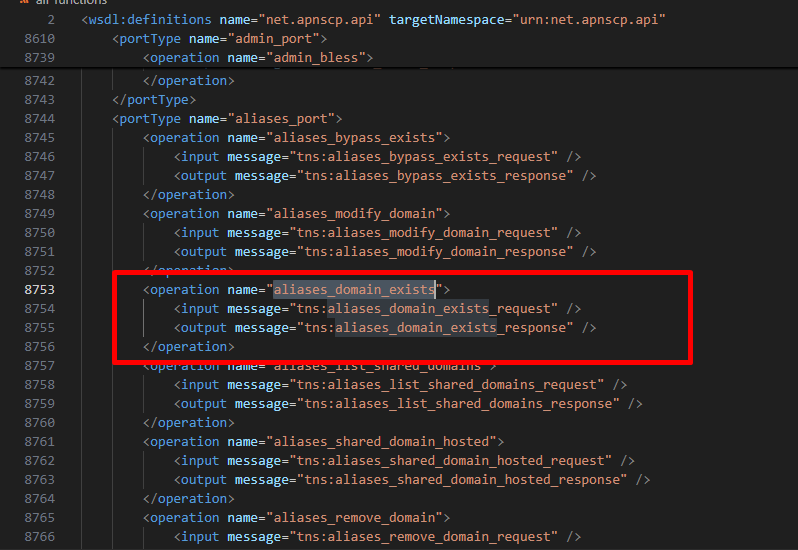
command aliases_domain_exists' does not exist

I called aliases_domain_exists function in postman, but the response says “command aliases_domain_exists’ does not exist”
I am very tired with soap apis.
Every time different format and responses.

# Request
<?xml version="1.0" encoding="utf-8"?>
<soap:Envelope xmlns:soap="http://schemas.xmlsoap.org/soap/envelope/" xmlns:xsi="http://www.w3.org/2001/XMLSchema-instance"  xmlns:tns="urn:net.apnscp.api" xmlns:tm="http://microsoft.com/wsdl/mime/textMatching/">
    <soap:Body>
        <tns:aliases_domain_exists>
            <session></session>
        </tns:aliases_domain_exists>
    </soap:Body>
</soap:Envelope>
# Response
<?xml version="1.0" encoding="UTF-8"?>
<SOAP-ENV:Envelope xmlns:SOAP-ENV="http://schemas.xmlsoap.org/soap/envelope/">
    <SOAP-ENV:Body>
        <SOAP-ENV:Fault>
            <faultcode>SOAP-ENV:Server</faultcode>
            <faultstring>command aliases_domain_exists' does not exist</faultstring>
        </SOAP-ENV:Fault>
    </SOAP-ENV:Body>
</SOAP-ENV:Envelope>

Super weird.
Please let me know what I am wrong.

ApisCP has four distinct roles. misc:list-commands may be used to enumerate available commands for a given role. We can use cpcmd to interact with this from command-line.

  • Appliance Administrator: manages everything
    cpcmd misc:list-commands
  • Reseller Administrator: manages collections of sites
    cpcmd -u somereseller misc:list-commands
  • Site Administrator: manages sites + users on sites
    cpcmd -d somedomain.com misc:list-commands
  • User Administrator: manages self
    cpcmd -d somedomain.com -u someuser misc:list-commands

A command doesn’t exist if it’s not within the role’s scope. In your example, you’re interacting as Appliance Administrator, when you would instead want to interact as Site Administrator.

To transition downward to a more specific role, use the hijack feature. admin:hijack(string $site, string $user = null, string $gate = null) which also exists as reseller:hijack() and site:hijack() to allow transitioning to something more specific. It returns a session identifier, which can be passed to subsequent API calls to apply in that new context.

For example, as an Appliance Administrator, call admin:hijack(“site1”) to create a new context as a Site Administrator for site1. Then site:hijack(null, “someuser”) to create a new context as a User Administrator for user “someuser” on site1.

Hello @msaladna , thanks for your explanation.
But I need to clarify further.
I am able to session id successfully, so I tried to add alias domain using aliases_add_domain api with this xml content.

I am building backend logic using nest.js and soap npm package, for now I am calling apis using postman for testing.

I tried to add alias to domain, so their function requires $domain and $path parameters, so I passed domain and path tag to post request body with session id.
When getting session id, I passed domain name and username that I just created with admin_add_site, so I assure session id is correct.

add_domain(string $domain, string $path): bool
# POST request:
https://{MY DOMAIN}:2083/soap?authkey={MY API KEY}
# POST body:
<?xml version="1.0" encoding="utf-8"?>
<soap:Envelope xmlns:soap="http://schemas.xmlsoap.org/soap/envelope/" xmlns:xsi="http://www.w3.org/2001/XMLSchema-instance" xmlns:tns="urn:net.apnscp.soap">  
    <soap:Body>
        <tns:aliases_add_domain>
            <session>ov8sQtsdgl9XzRAnjE3kCFHi5TrxrJCk</session>
            <domain>example01.com</domain>
            <path>/var/www/html/example01.com</path>
        </tns:aliases_add_domain>
    </soap:Body>
</soap:Envelope>
# Response:
<?xml version="1.0" encoding="UTF-8"?>
<SOAP-ENV:Envelope xmlns:SOAP-ENV="http://schemas.xmlsoap.org/soap/envelope/">
    <SOAP-ENV:Body>
        <SOAP-ENV:Fault>
            <faultcode>SOAP-ENV:Server</faultcode>
            <faultstring>command `aliases_add_domain' does not exist</faultstring>
        </SOAP-ENV:Fault>
    </SOAP-ENV:Body>
</SOAP-ENV:Envelope>

There is no explanation about this kind of request in apiscp document, so what I want to know exactly to how to call their apis with session id and how to pass parameters because their api structure is just xml which it doesn’t use these days.
XML post request body is not generated by me, it’s generated automatically soap npm package.
I am trying to making xml structure correctly , so that I can get the correct responses from apiscp api calls.
Please let me know whether endpoint url and xml body structure is correct or not.
Thanks.

Session ID parameter is called “esprit_id”. “session” is not a valid parameter. It would be passed as soap?esprit_id=NEWID or as a cookie (esprit_id).

Sample code from WHMCS module.

Oh really?
Can I know why this kind of helper document doesn’t exist?
Do you have any document links to reference when developing?
Actually, apiscp document is not explained enough. Make me confused.
Thank you so much!
Not enough hours in a day to tackle every facet. I’ve tried cloning myself but the technology just isn’t here yet. PRs are much appreciated: GitHub - apisnetworks/apiscp-docs: ApisCP documentation.

Awesome!
Thank you so much for your help!! :grinning:

I got this error.

Error: SOAP-ENV:Server: Aliases_Module::add_domain(): Primary domain may not be replicated as a shared domain

What does this mean?

Ah, I passed /var/www/html/example01.com as path, and passed example01.com as domain.
Well, I can’t use same domain name in path? So I got an error?

Well, I need to pass other one such as username like this?

<?xml version="1.0" encoding="utf-8"?>
<soap:Envelope xmlns:soap="http://schemas.xmlsoap.org/soap/envelope/" xmlns:xsi="http://www.w3.org/2001/XMLSchema-instance" xmlns:tns="urn:net.apnscp.soap">  
    <soap:Body>
        <tns:aliases_add_domain>
            <session>ov8sQtsdgl9XzRAnjE3kCFHi5TrxrJCk</session>
            <domain>example01.com</domain>
            <path>/var/www/html/example01_user</path>
        </tns:aliases_add_domain>
    </soap:Body>
</soap:Envelope>

Ah, I passed primary domain, I can’t use it as alias domain.
Thank you for your help.